
Perform Ad-hoc Assessments
What are ad-hoc assessments
An Ad-hoc Assessment allows users to re-evaluate a vendor's risk profile after onboarding — without needing to re-add the vendor or modify a contract. This is useful for periodic reviews, triggered events (e.g. breaches or media reports), or internal audit requirements.
Each assessment includes:
- Global Sanctions Check
- Exposure Risk Rating (ERR)
- ESG Risk Rating
The assessment is performed directly within the Vendor View and results are displayed immediately.
Who can perform ad-hoc assessments
Access to run ad-hoc assessments is restricted to:
- Agents
- Contract Owners with an active contract for that vendor
Users on free or startup plans will only see partial results (obscured values), while advanced and expert plans will display full certificates.
All users, regardless of role or plan, can view existing assessments.
If a user does not meet the conditions, the "Perform assessment" button will appear greyed out.
Performing an ad-hoc assessment
To perform an ad-hoc assessment:
- Navigate to the Vendor View for the relevant vendor.
- Select the Assessments tab.
- Click the "Perform assessment" button (top-right of screen).
- A modal will appear asking the user to confirm the action.
- Click "Start assessment" to begin.
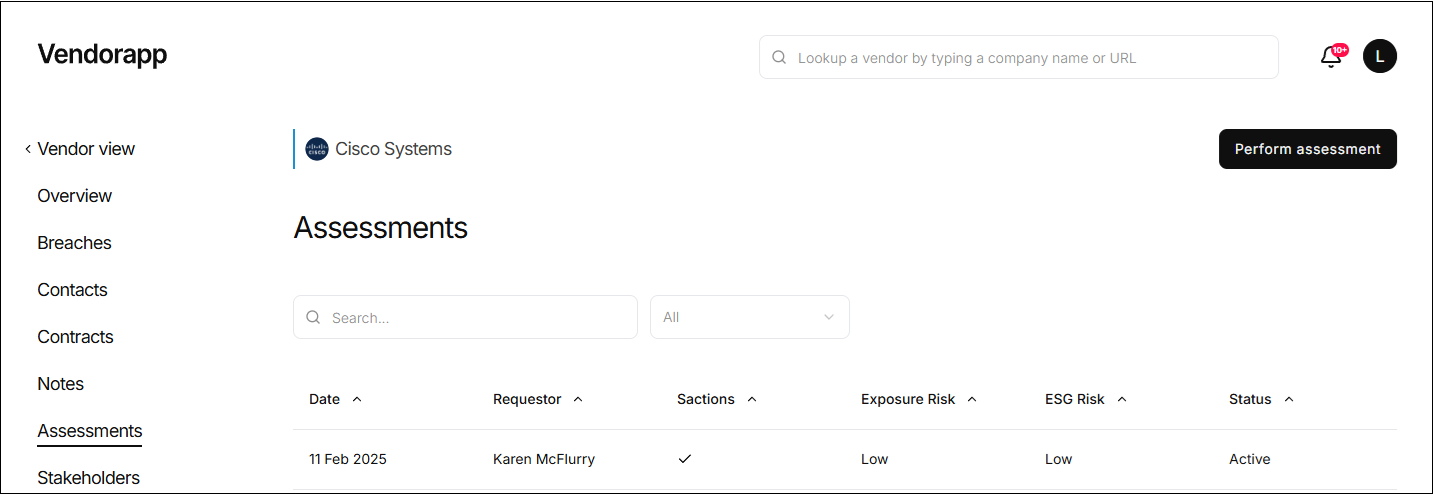
Vendorapp will then run:
- A fresh sanctions screen
- A reassessment of Exposure Risk
- A reassessment of ESG Risk
This process takes just a few seconds.
⚠️ If a vendor is newly found on a sanctions list, a task will be created for an Agent to review. The vendor will remain active until the agent approves or rejects its continued use.
Understanding the results
Once completed, the results will be displayed in a certificate modal. Depending on your plan:
-
Advanced / Expert Plan:
Full details will be visible, including:
- Sanctions: Yes/No
- Exposure Risk: High, Medium, or Low
- ESG rating: one, two or three leaves (more leaves = stronger ESG evidence)
-
Free / Startup Plan:
Results will be partially obscured. A lock icon and blurred sections will indicate restricted data access. Users will still see basic information like date and type.
The certificate is stored in the Assessments tab under the relevant vendor.
Assessment visibility and access
All users can view the assessment list within the Vendor View, including:
- Date of Assessment
- Type (Pre-screen or Ad-hoc)
- Risk Results (Full or obscured)
- Download option (if plan allows)
- Ability to click into the certificate (visibility depends on plan level)
Assessments are marked clearly by date, and a dropdown filter allows users to select:
- Active (most recent)
- Archived (older assessments)
- All
Only one active assessment is stored at a time. Any new ad-hoc assessment automatically archives the previous one.
Assessment expiry and auto-refresh
All assessments have a 12-month lifespan.
-
If no ad-hoc assessment is performed within that time:
- Vendorapp will run an automatic refresh of the most recent assessment.
-
If the vendor is flagged during a refresh (e.g. new sanctions), all active contract owners are notified.
If a new ad-hoc assessment is performed before the 12-month limit, the countdown resets, and the previous certificate is archived.
Plan limits and access restrictions
Plan-specific limits apply:
- Free Plan: 15 assessments per month
- Startup Plan: 150 assessments per month
- Advanced Plan: 500 assessments per month
- Expert Plan: 1000 assessments per month
If a user attempts to exceed their monthly limit:
-
The "Perform assessment" button is disabled.
-
Clicking will display:
"Plan limit reached, upgrade plan."
⚠️ Ad-hoc assessments are the same assessments that are performed when a vendor is added.