
Manage Alerts/Notifications
What are Vendorapp notifications
Vendorapp uses a combination of in-app and email notifications to help users stay on top of key events, such as contract actions, breaches, tasks, and account sign-in limits.
Notifications are automatic and role-based, ensuring that the right users are informed at the right time, without overwhelming others with irrelevant messages.
Notification types
Vendorapp sends the following types of notifications:
-
Contract-related
- Expiry warnings
- Auto-renewal reminders
- Closure and cancellation confirmations
-
Task notifications
- New tasks assigned (e.g. breach review, sanction approval)
- Task completion notifications
-
Breach notifications
- Acknowledged breaches (for contract owners)
- Rejected breaches
- Breaches impacting current vendors
-
Stakeholder changes
- Added to a contract
- Stakeholder accepted invite
- Stakeholder revoked
-
Assessment results
- Ad-hoc or auto-assessments completed
- Sanction detected
-
Usage limits
- Approaching or exceeded plan thresholds (e.g. contracts, vendors, assessments)
-
System alerts
- Login from new device/location
- Billing failures or account changes (Agent Owner only)
Who receives notifications
Notification delivery is based on user role and their relationship to the vendor or contract:
- Agents receive all relevant notifications, including plan usage and tasks.
- Contract Owners receive notifications related to their own contracts and associated vendors.
- Viewers receive notifications only if they are stakeholders on an affected contract.
- Agent Owners receive system-level alerts (e.g. billing failures, account changes).
Vendorapp ensures that notifications are never sent to users without appropriate access to the underlying data (e.g. contract value or breach content).
In-app notifications
The bell icon in the top-right corner of Vendorapp is your hub for in-app notifications.
- A red dot will appear on the bell icon when new notifications are available.
- Clicking the icon opens a dropdown list of recent notifications.
- At the bottom of the list, users can click "See more" to open the full notification history in a scrollable view.
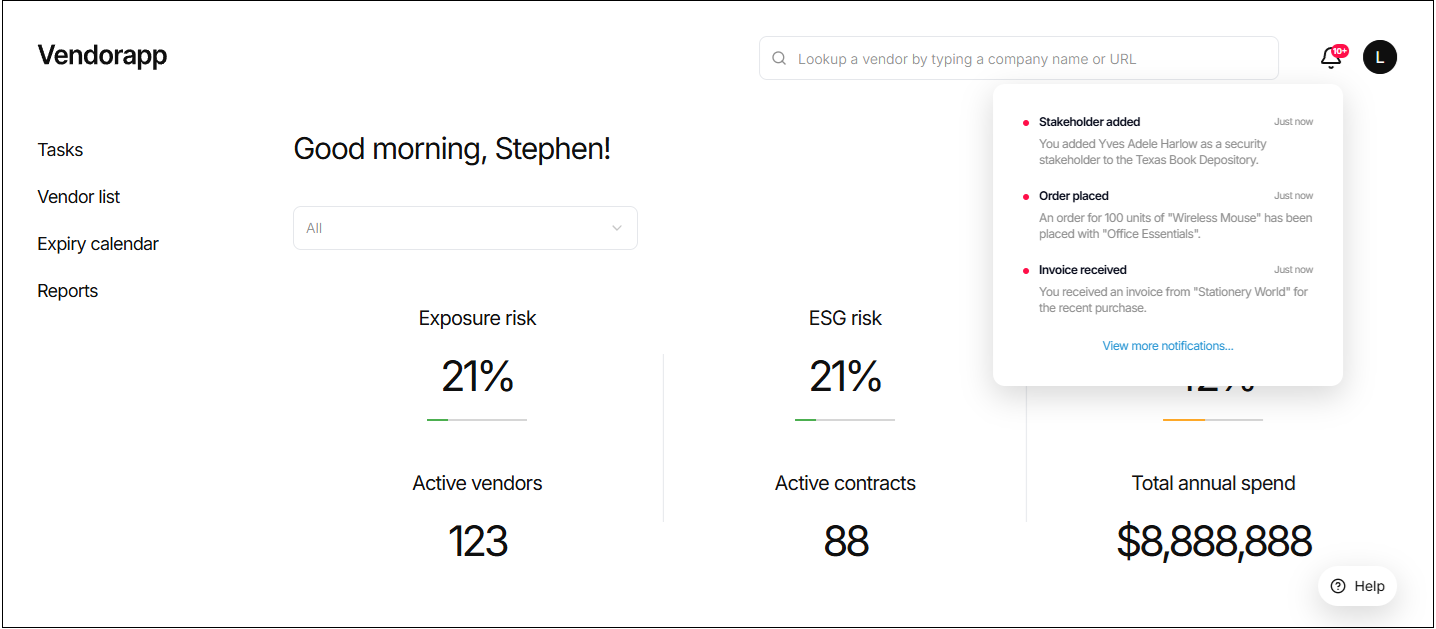
Notifications are shown in reverse chronological order and are automatically marked as read when opened.
Email notifications
Certain key events also trigger email notifications, including:
- Task assignments and completions
- Contract expiry notices
- Stakeholder invites
- Transfer of contracts
- Usage limit warnings
Emails are sent to the address associated with the user's Vendorapp account. Users cannot opt out of system-critical email alerts (e.g. password resets, billing failures).
Managing notification settings
Currently, notification preferences are managed automatically based on user role and context. Manual notification configuration (e.g. toggles or digest mode) is not yet available.
However:
- Users can dismiss or ignore in-app notifications
- Agents can manage who is added as a stakeholder to reduce unnecessary alerts
Future releases may allow for more granular user-level notification preferences.
Expiry-related notifications and tasks
Vendorapp includes intelligent notification workflows for contract expiry, based on contract type:
-
Core Agreements & Work Orders:
- Email notifications at 90, 60, and 30 days before expiry
- If no action is taken, a system task is created to close the contract before auto-renewal
-
Subscription-based Contracts:
- Notifications at 90, 60, 30, and 7 days
- If no response is received, the subscription is auto-cancelled on the expiry date
-
Support/Performance Contracts:
- Notified 30 days before expiry
- User can confirm 12-month renewal or allow auto-archive
-
Compliance & Confidentiality Contracts:
- Single expiry notification; no response needed
- Contracts are auto-archived
Each notification contains clear instructions and relevant options, depending on the contract type and stage.
Plan limits and restrictions
-
Users on all plans receive notifications relevant to their role.
-
Usage limit alerts (e.g. "contract limit reached") are sent weekly to Agents once thresholds are nearing.
-
When a plan limit is reached:
- Actions like adding vendors or performing assessments will be blocked.
- Clicking these actions will display:
"Plan limit reached, upgrade plan."
List of notifications
Note: Does not include email invitations, OTP login information or direct communications from Vendorapp support or other responses to emails.
Email app notifications
Who receives email notifications from Vendorapp.
In-app notifications
Who receives in-app notifications from vendorapp.